Monday, March 21, 2011

Registration now open: IBM Exceptional Web Experience Conference 2011

In case you missed it, the IBM Exceptional Web Experience Conference 2011 registration has started.  This conference is dedicated to helping organizations be more successful by highlighting proven business solutions and technical strategies designed to keep pace with rapidly evolving web user demand and expectations.


The conference will be held May 16 - 19, 2011 at the Buena Vista Palace Hotel in Lake Buena Vista, FL.


More information and registration.

Friday, March 11, 2011

My Battle with AIX: Part 1

I started installing Connections 3.0 on AIX this week.  The time I have invested in this so far is more then I was expecting.  The biggest thing I took for granted was how much I enjoyed having an AIX administrator in my past lives.  Being my own DBA and SysOp in addition to being the “app guy” has been a steeper learning curve then I was expecting.  I have administered Linux servers of various flavors over the years, but AIX is just different enough to frustrate me.  I found that there is a massive library of open source applications that you can install via RPM on AIX to make it a bit more palatable.  So after installing bash and switching my shell, I was finally able to move through the system more nimbly.  If you have not discovered it yet, also be sure to install GNU tar as there are documented limitations with the OOTB AIX tar and the path lengths of some of the required packages for Connections.

So after a week of learning how to build LPARs, patch AIX, work with both the X and command line version of SMIT, resize file systems, patch EVERY package under the sun, install open source code on AIX to replace the limited existing app… WHEW… I finally have the base components required to install Connections next week squared away.  The last lingering overhead component at this point is populating the Profiles database before installing Connections.

Out of curiosity… does anyone know why the wizards don’t want to work?  I am pushing output to an Xming server on a Windows machine which worked just fine for all of the product installers, just none of the Wizards… grrr

Well, it is time to call it a week and spend some time with the fam… until next time!

Thursday, March 03, 2011

PuTTY Access to IBM Cloud

At LS11, IBM offered some of us the opportunity to preview a Domino server in the IBM Cloud.  I was able to score a test account and just provisioned my instance.  Chris Miller @ IdoNotes had a great video to get you started on configuring your account and first instance in this video.  Once I was up and running, I tried to connect to my instance via SSH as the dashboard boasted I could do.  During the provisioning of the instance, you are prompted to associate a private RSA key with the instance.  If you do not have one already, the provisioning site helps you generate one and save it to your computer.  It is associated with your IBM ID you used to create the cloud instance.  You are also prompted to create an Admin ID, but this is apparently the first Domino user for this domain created with this instance. 

TIP: Remember your Domino admin password.  The Username is Admin.  You can download the ID file once you gain access to the web administrator from the person document.

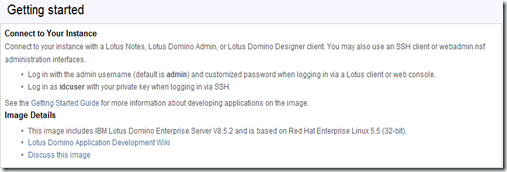
At the bottom of the administration console, there was some information about accessing the newly started instance.
image

After entering the IDs it listed in the administration console, I realized I needed to configure PuTTY to use the pre-shared key I created during provisioning to access the server.

Since many people are running Domino on Windows, or do not have a PSK infrastructure in place for securing their Domino servers running on Unix/Linux I figured this may be a good piece of information to share with everyone.

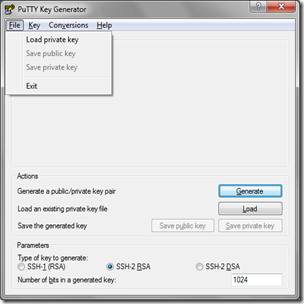
If you did not download the whole PuTTY package, download PuTTYgen.  Once you have PuTTYgen, launch it.  Then proceed to click on File > Load private key
image

Browse to the RSA key file you used or downloaded when configuring your IBM Cloud account.
image

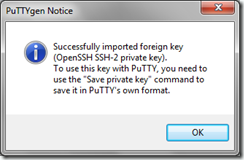
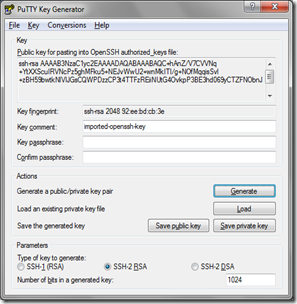
PuTTYgen will tell you it successfully opened a SSH-2 PSK and it will need to be converted to the PuTTY format for it to work.  Click OK.  You can then create a key file passphrase in the provided fields in the middle.
image

Select File > Save private key and save the PPK (PuTTY Pre-shared Key) file somewhere that you will remember.

Now that you have converted your key to PuTTY format, you can configure PuTTY to use the key file as the authentication mechanism for accessing your IBM Cloud server.  After establishing the session information in the initial screen, like IP address of your server and the protocol to use, navigate to Connection > SSH > Auth, and use the Browse button to locate your PPK file you just created.
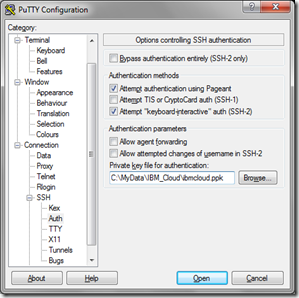
image

Return to the Session screen at the top of the left column and save your session.  You will now be able to connect to your IBM Cloud server via SSH.  Just provide the correct user, idcuser, and you are all set.

Wednesday, February 23, 2011

Teacher’s Blog Spells Bad News

I found this article today:

http://news.yahoo.com/s/ap/20110223/ap_on_hi_te/us_teacher_suspended_blog

While we can use it as another example of what not to say on your blog, it raises a really interesting point.  If you post or publish something that is perceived as objectionable or offensive by others, is the problem theirs or yours?  Asked a different way, what is considered adequate anonymity in postings and content to not warrant this sort of backlash if someone vents frustrations in a semi-public way?  In reading this article, and we cannot go to the source since it was already taken down, the teacher believes she was venting to family and friends about her job.  She did not mention her self, school, or the specific students her comments were describing.  The fact that students were able to connect the blog with this teacher and took offense to the content is why she found her self in trouble with the school board she works (or worked) for.

We know the best types of communications are real communications in social tools.   It is generally accepted that representing your brand or self in a very genuine way is encouraged.  So at where does the line in the sand exist when we change from being real and honest to being belligerent and degrading?  Is it really so different than verbal communication?  Can we expect any sort of privacy when the internet is seemingly never forgetting?  Perhaps email communication, private wall posts on Facebook, or selective use of the teacher’s social network would have been more appropriate avenues for her to vent such frustrations than her publicly available blog.  I can not say for sure, but one thing is clear to me.  When you are charged with the shaping of our youth and take on the noble profession of educator, the public eye will be very critical of all your actions.